Oh snap! You are using an old version of browser. Update your browser to get new awesome features. Click for more details.
Showing posts with label Magento 2. Show all posts

How to call CLI command via Cron file and pass an object as param


Put this code in your cron file

/**
 * @var \Magento\Framework\Serialize\SerializerInterface
 */
private $serializer;

/**
 * @var \Magento\Catalog\Model\ResourceModel\Product\CollectionFactory
 */
private $productCollectionFactory;

public function __construct(
    \Magento\Framework\Serialize\SerializerInterface $serializer,
    \Magento\Catalog\Model\ResourceModel\Product\CollectionFactory $productCollectionFactory
) {
    $this->serializer               = $serializer;
    $this->productCollectionFactory = $productCollectionFactory;
}

public function execute()
{
    $collection = $this->productCollectionFactory->create();
    $collection->addAttributeToSelect('*');
    $collection = $this->serializer->serialize($collection);
    //Set you CLI command here and pass product collection array in the --collection argument
    system('php bin/magento customer:product:update --collection='.escapeshellarg($collection));

}

How to get --collection data in CLI file

$collection = $input->getOption(self::COLLECTION_OBJECT);

$collection = $this->serializer->unserialize($collection);

Magento 2 How to add native captcha to a custom form

Follow some step for using magento captcha into custom module.

Step 1. Vendor/Module/etc/config.xml

<?xml version="1.0"?>
<config xmlns:xsi="http://www.w3.org/2001/XMLSchema-instance" xsi:noNamespaceSchemaLocation="urn:magento:module:Magento_Store:etc/config.xsd">
<default>
<customer>
<captcha>
<always_for>
<custom_form>1</custom_form>
</always_for>
</captcha>
</customer>
<captcha translate="label">
<frontend>
<areas>
<custom_form>
<label>Custom Form</label>
</custom_form>
</areas>
</frontend>
</captcha>
</default>
</config>

Step 2: Goto 'Admin -> Stores -> Configuration -> Customer -> Customer Configuration -> Captcha' and configure. You can able to see new forms value 'Custom Form'

Select form and save

Step 3: Create Vendor/Module/view/frontend/layout/yourroutid_index_index.xml

<?xml version="1.0"?>
<page layout="1column" xmlns:xsi="http://www.w3.org/2001/XMLSchema-instance" xsi:noNamespaceSchemaLocation="urn:magento:framework:View/Layout/etc/page_configuration.xsd">
    <body>
<referenceContainer name="content">
<block class="Vendor\Module\Block\Customform" name="custom-index" template="custom-form.phtml">
                <container name="form.additional.info" label="Captcha">
                    <block class="Magento\Captcha\Block\Captcha" name="captcha" after="-" cacheable="false">
                        <action method="setFormId">
                            <argument name="formId" xsi:type="string">custom_form</argument>
                        </action>
                        <action method="setImgWidth">
                            <argument name="width" xsi:type="string">230</argument>
                        </action>
                        <action method="setImgHeight">
                            <argument name="width" xsi:type="string">50</argument>
                        </action>
                    </block>
                </container>
            </block>
</referenceContainer>

        <referenceBlock name="head.components">
            <block class="Magento\Framework\View\Element\Js\Components" name="captcha_page_head_components" template="Magento_Captcha::js/components.phtml"/>
        </referenceBlock>
</body>
</page>

Step 4: Vendor/Moduel/view/frontend/templates/custom-form.phtml

<div>
    <form class="custom-form"
          action="<?php echo $block->getFormAction(); ?>"
          id="custom_form"
          name="custom_form"
          method="post"
          enctype="multipart/form-data"
          data-hasrequired="<?php echo __('* Required Fields') ?>"
          data-mage-init='{"validation":{}}'>

        <h3><?php echo __('Custom Form')?></h3>
        <fieldset class="fieldset rma-info">
            <div class="field email required">
                <label class="label" for="rma_email"><?php echo __('Email')?></label>
                <input name="rma_email" id="rma_email" value="<?php echo $block->getCustomerLoggedIn() ? $data->getEmail(): "" ;?>" class="input-text" type="email" data-validate="{required:true, 'validate-email':true}" />
            </div>

            <div class="field name required">
                <label class="label" for="customer_name"><?php echo __('Name')?></label>
                <input name="customer_name" id="customer_name" value="<?php echo $block->getCustomerLoggedIn() ? $data->getFirstname(): "" ;?>" class="input-text" type="text" data-validate="{required:true}" />
            </div>

            <div class="field phone required">
                <label class="label" for="phone"><?php echo __('Phone Number') ?></label>
                <input name="phone" id="phone" class="input-text" type="text" data-validate="{required:true}" />
            </div>

            <div class="field address required">
                <label class="label" for="address"><?php echo __('Address') ?></label>
                <input name="address" id="address" class="input-text" type="text" data-validate="{required:true}" />
            </div>

            <!-- Display captcha -->
            <?php echo $block->getChildHtml('form.additional.info'); ?>
            <!-- Display captcha -->

        </fieldset>

        <div class="actions-toolbar">
            <div class="primary">
                <button type="submit" title="<?php echo __('Submit') ?>" class="action submit primary">
                    <span><?php echo __('Submit') ?></span>
                </button>
            </div>
        </div>
    </form>
</div>

Now you can able to see captcha into your form. Now need to validation your captcha using observer. So I use post controller predispatch event for validation.

Step 5: Vendor/Module/etc/frontend/events.xml

<?xml version="1.0"?>
<config xmlns:xsi="http://www.w3.org/2001/XMLSchema-instance" xsi:noNamespaceSchemaLocation="urn:magento:framework:Event/etc/events.xsd">
    <event name="controller_action_predispatch_yourroute_index_post">
        <observer name="captcha_custom_form" instance="Vendor\Module\Observer\CheckCustomFormObserver" />
    </event>
</config>

Step 6: Vendor/Module/Observer/CheckCustomFormObserver.php

<?php
namespace Vendor/Module\Observer;

use Magento\Framework\Event\ObserverInterface;

class CheckCaptchaFormObserver implements ObserverInterface {

    protected $_helper;

    protected $_actionFlag;

    protected $messageManager;

    protected $_session;

    protected $_urlManager;

    protected $captchaStringResolver;

    protected $redirect;

    public function __construct(
        \Magento\Captcha\Helper\Data $helper,
        \Magento\Framework\App\ActionFlag $actionFlag,
        \Magento\Framework\Message\ManagerInterface $messageManager,
        \Magento\Framework\Session\SessionManagerInterface $session,
        \Magento\Framework\UrlInterface $urlManager,
        \Magento\Framework\App\Response\RedirectInterface $redirect,
        \Magento\Captcha\Observer\CaptchaStringResolver $captchaStringResolver
    ) {
        $this->_helper = $helper;
        $this->_actionFlag = $actionFlag;
        $this->messageManager = $messageManager;
        $this->_session = $session;
        $this->_urlManager = $urlManager;
        $this->redirect = $redirect;
        $this->captchaStringResolver = $captchaStringResolver;
    }

    public function execute(\Magento\Framework\Event\Observer $observer) {
        $formId = 'custom_form';
        $captchaModel = $this->_helper->getCaptcha($formId);

        $controller = $observer->getControllerAction();
        if (!$captchaModel->isCorrect($this->captchaStringResolver->resolve($controller->getRequest(), $formId))) {
            $this->messageManager->addError(__('Incorrect CAPTCHA'));
            $this->_actionFlag->set('', \Magento\Framework\App\Action\Action::FLAG_NO_DISPATCH, true);
            $this->_session->setCustomerFormData($controller->getRequest()->getPostValue());
            $url = $this->_urlManager->getUrl('yourroute/index/index', ['_nosecret' => true]);
            $controller->getResponse()->setRedirect($this->redirect->error($url));
        }

        return $this;
    }
}


Reference URL

Magento 2 add google recaptcha in custom form


Add recaptcha js file in your xml
Path: app/code/Name_space/Module_name/view/frontend/layout

<?xml version="1.0"?>
<page layout="1column" xmlns:xsi="http://www.w3.org/2001/XMLSchema-instance" xsi:noNamespaceSchemaLocation="urn:magento:framework:View/Layout/etc/page_configuration.xsd">
<head>
<script src="https://www.google.com/recaptcha/api.js" src_type="url" />
</head>
</page>


Add recaptcha code in your phtml file
Path: app/code/Name_space/Module_name/view/frontend/templates

First add onsubmit event in form, It's validate recaptcha field via javascript.

<form class="test-form"
      action="<?php echo $block->getFormAction(); ?>"
      id="test_form"
      method="post"
      enctype="multipart/form-data"
      onsubmit="return capatcheFunction()"
      data-hasrequired="<?php echo __('* Required Fields') ?>"
      data-mage-init='{"validation":{}}'>


Add recaptcha field in form

<div class="field recaptcha">
    <div class="g-recaptcha" name="recaptcha" id="recaptcha" data-sitekey="Put Your Google Captcha Site Key Here"></div>
</div>


Add JavaScript function after form

<script type="text/javascript">
function capatcheFunction() {
    var exists = document.getElementById("g-recaptcha-response");
    if(exists == null){

    } else{
        var check = document.getElementById("g-recaptcha-response").value;
        if(check=='' || check == null){
            document.getElementById("recaptcha").style.border = "1px solid #ea0e0e";
            return false;
        }
        else{
            document.getElementById("recaptcha").style.border = "none";
            return true;
        }
    }
}
</script>


Full code example is below

<div>
    <form class="form-rma"
          action="<?php echo $block->getFormAction(); ?>"
          id="rma_form"
          method="post"
          enctype="multipart/form-data"
          onsubmit="return capatcheFunction()"
          data-hasrequired="<?php echo __('* Required Fields') ?>"
          data-mage-init='{"validation":{}}'>

        <h3><?php echo __('Testing Form')?></h3>
        <fieldset class="fieldset rma-info">
            <div class="field name required">
                <label class="label" for="customer_name"><?php echo __('Name')?></label>
                <input name="customer_name" id="customer_name" class="input-text" type="text" data-validate="{required:true}" />
            </div>

            <div class="field email required">
                <label class="label" for="email"><?php echo __('Email')?></label>
                <input name="email" id="email" class="input-text" type="email" data-validate="{required:true, 'validate-email':true}" />
            </div>

            <div class="field phone required">
                <label class="label" for="phone"><?php echo __('Phone Number') ?></label>
                <input name="phone" id="phone" class="input-text" type="text" data-validate="{required:true}" />
            </div>

            <div class="field address required">
                <label class="label" for="address"><?php echo __('Address') ?></label>
                <input name="address" id="address" class="input-text" type="text" data-validate="{required:true}" />
            </div>

            <div class="field recaptcha">
                <div class="g-recaptcha" name="recaptcha" id="recaptcha" data-sitekey="Put Your Google Captcha Site Key Here"></div>
            </div>
        </fieldset>

        <div class="actions-toolbar">
            <div class="primary">
                <button type="submit" title="<?php echo __('Submit') ?>" class="action submit primary">
                    <span><?php echo __('Submit') ?></span>
                </button>
            </div>
        </div>
    </form>
</div>
<script type="text/javascript">
function capatcheFunction() {
    var exists = document.getElementById("g-recaptcha-response");
    if(exists == null){

    } else{
        var check = document.getElementById("g-recaptcha-response").value;
        if(check=='' || check == null){
            document.getElementById("recaptcha").style.border = "1px solid #ea0e0e";
            return false;
        }
        else{
            document.getElementById("recaptcha").style.border = "none";
            return true;
        }
    }
}
</script>


Validate recaptcha in controller
Path: app/code/Name_space/Module_name/Controller/Index

public function execute()
{
    $post = $this->getRequest()->getParams();
    $request = $this->getRequest();
    $remoteAddress = new \Magento\Framework\Http\PhpEnvironment\RemoteAddress($this->getRequest());
    $visitorIp = $remoteAddress->getRemoteAddress();

    $storeScope = \Magento\Store\Model\ScopeInterface::SCOPE_STORE;
    $secret = 'Put Google Captcha Secret Key Here';
    $response = null;
    $path = 'https://www.google.com/recaptcha/api/siteverify?';
    $secretKey = $secret;
    $response = $post["g-recaptcha-response"];
    $remoteIp = $visitorIp;

    $response = file_get_contents($path."secret=$secretKey&response=$response&remoteip=$remoteIp");
    $answers = json_decode($response, true);
    if (trim($answers['success']) != true) {
        echo 'Invalid captcha please enter the valid captcha';exit;
    } else {
    echo 'Captcha is valid';exit;
    }
}

Magento 2 add Buy Now button on product view page


This module add "Buy Now" button on product view page, When user click  this button to process directly checkout. Here is  link to download it.

Installation Instruction

- Unzip Magebug_BuyNow.zip file
- Move app folder into your project root directory
- Run command: php bin/magento setup:upgrade
- Run command: php bin/magento cache:flush

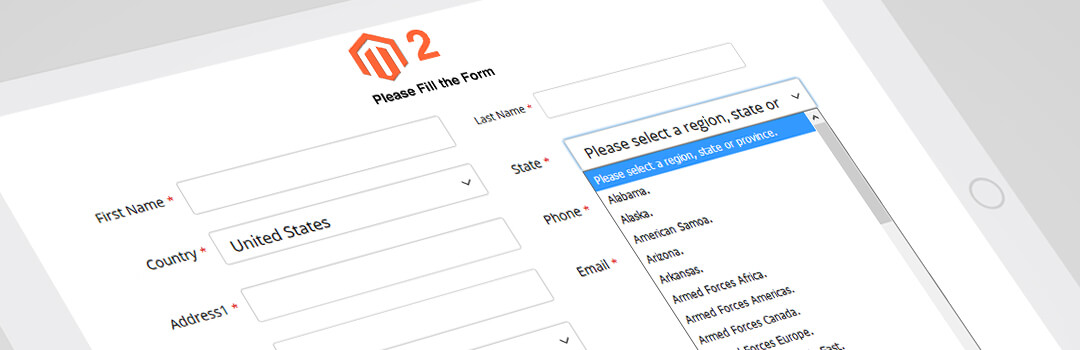
Magento 2 How to Display Country & State/Province Dropdown in Custom Frontend Form


First create block file and put below code in this file.

<?php
namespace NameSpace\ModuleName\Block;

class Form extends \Magento\Directory\Block\Data
{
    protected $_customerSession;

    public function __construct(
        \Magento\Framework\View\Element\Template\Context $context,
        \Magento\Directory\Helper\Data $directoryHelper,
        \Magento\Framework\Json\EncoderInterface $jsonEncoder,
        \Magento\Framework\App\Cache\Type\Config $configCacheType,
        \Magento\Directory\Model\ResourceModel\Region\CollectionFactory $regionCollectionFactory,
        \Magento\Directory\Model\ResourceModel\Country\CollectionFactory $countryCollectionFactory,
        \Magento\Customer\Model\SessionFactory $customerSession,
        array $data = []
    ) {
        $this->_customerSession = $customerSession->create();
        parent::__construct(
            $context,
            $directoryHelper,
            $jsonEncoder,
            $configCacheType,
            $regionCollectionFactory,
            $countryCollectionFactory,
            $data
        );
    }

    public function getCustomerLoggedIn()
    {
        if ($this->_customerSession->isLoggedIn()) {
            return $this->_customerSession->getCustomer();
        }
    }

    public function getFormData()
    {
        $data = $this->getData('form_data');
        if ($data === null) {
            $formData = $this->_customerSession->getCustomerFormData(true);
            $data = new \Magento\Framework\DataObject();
            if ($formData) {
                $data->addData($formData);
                $data->setCustomerData(1);
            }
            if (isset($data['region_id'])) {
                $data['region_id'] = (int)$data['region_id'];
            }
            $this->setData('form_data', $data);
        }
        return $data;
    }

    public function getConfig($path)
    {
        return $this->_scopeConfig->getValue($path, \Magento\Store\Model\ScopeInterface::SCOPE_STORE);
    }
}

Second create phtml file in your module

<?php
$countryList = $block->getCountries();
$regionList = $block->getRegion();
?>
<div>
    <form class="form-contact"
          action=""
          id="form-contact"
          method="post"
          data-hasrequired="<?php echo __('* Required Fields') ?>"
          data-mage-init='{"validation":{}}'>
         
        <fieldset class="fieldset contact-info">
            <div class="field region required">
                <label for="region_id" class="label"><span><?php echo __('State/Province:') ?></span></label>
                <div class="control">
                    <select id="region_id" name="region_id" title="<?php echo __('State/Province') ?>" class="validate-select" style="display:none;">
                        <option value=""><?php echo __('Please select a region, state or province.') ?></option>
                    </select>
                    <input type="text" id="region" name="region" value="<?php echo $block->getRegion() ?>" class="input-text <?php echo $block->escapeHtmlAttr($this->helper('Magento\Customer\Helper\Address')->getAttributeValidationClass('region')) ?>" style="display:none;">
                </div>
            </div>

            <div class="field country required">
                <label for="country" class="label"><span><?php echo $block->escapeHtml(__('Country:')) ?></span></label>
                <div class="control">
                    <?php echo $block->getCountryHtmlSelect() ?>
                </div>
            </div>
        </fieldset>
    </form>
</div>

<script type="text/x-magento-init">
    {
        "#country": {
            "regionUpdater": {
                "optionalRegionAllowed": <?= /* @noEscape */ $block->getConfig('general/region/display_all') ? 'true' : 'false' ?>,
                "regionListId": "#region_id",
                "regionInputId": "#region",
                "postcodeId": "#zip",
                "form": "#form-validate",
                "regionJson": <?= /* @noEscape */ $this->helper(\Magento\Directory\Helper\Data::class)->getRegionJson() ?>,
                "defaultRegion": "<?= (int) $block->getRegionId() ?>",
                "countriesWithOptionalZip": <?= /* @noEscape */ $this->helper(\Magento\Directory\Helper\Data::class)->getCountriesWithOptionalZip(true) ?>
            }
        }
    }
</script>

Magento 2 Load Region By Region Id


If you need region data by region id. check the below code.


/**
* @var \Magento\Directory\Model\RegionFactory
*/
protected $_regionFactory;

public function __construct(
    \Magento\Directory\Model\RegionFactory $regionFactory $regionFactory
) {
    $this->_regionFactory = $regionFactory;
}

function getRegionDataById($regionId){
//Ex. $regionId = 12;
$region = $this->_regionFactory->create();
        $region->load($regionId);
        echo '<pre>';print_r($region->getData());exit;
}

Output
Array
(
    [region_id] => 12
    [country_id] => US
    [code] => CA
    [default_name] => California
    [name] => California
)

hope so it will help.

Magento 2 - Get product active filters using Event Obeserver


Create events.xml

Path: app/code/Module_Name_Space/Module_Name/etc/frontend/events.xml

Put this code

<?xml version="1.0"?>
<config xmlns:xsi="http://www.w3.org/2001/XMLSchema-instance" xsi:noNamespaceSchemaLocation="urn:magento:framework:Event/etc/events.xsd">
    <event name="layout_generate_blocks_after">
    <observer name="customize-category-block" instance="Module_Name_Space/Module_Name\Observer\Filters" />
</event>
</config>


Now create observer file Filters.php

Path: app/code/Indianic/CategoryTab/Observer/Filters.php

Put this code

<?php
namespace Module_Name_Space\Module_Name\Observer;

use Magento\Framework\Event\ObserverInterface;
use Magento\Catalog\Model\Layer\Resolver as LayerResolver;

class Categoryblock implements ObserverInterface
{
    /**
     * @var \Magento\Catalog\Model\Layer\Category
     */
    protected $catalogLayer;

    public function __construct(
        LayerResolver $layerResolver
    ) {
        $this->catalogLayer = $layerResolver->get();
    }

    public function execute(\Magento\Framework\Event\Observer $observer)
{
    $action = $observer->getData('full_action_name');
    if ($action !== 'catalog_category_view') {
        return;
    }

        // Get selected filters
        $layer = $this->catalogLayer;
        $activeFilters = $layer->getState()->getFilters();
}
}

Also you can unset layout this observer, put below code in execute function

/** @var \Magento\Framework\View\Layout $layout */
$layout = $observer->getData('layout');
$layout->unsetElement('Element_Name_Here');

Magento 2 Add tabs with product attribute content on product page


In Magento, like in most other eCommerce platforms, tabbed navigation is utilized on product pages for displaying various product information and data. By default, and this is the same for Luma and Blank theme, there are three tabs on the product page. If you want to add an extra tab on product detail page and display product attribute value on this tab. So maybe this article help you.

Here is module link. You can download and easy to install.

Install extension by command line

Step 1: Download the extension

Step 2: Unzip the file in a temporary directory

Step 3: Upload app folder to your Magento installation root directory

Step 4: Enter the following at the command line:

- php bin/magento setup:upgrade
- sudo php bin/magento setup:di:compile
If magento deploy mode is developer
- sudo php bin/magento setup:static-content:deploy -f
If magento deploy mode is production
- sudo php bin/magento setup:static-content:deploy
- php bin/magento cache:flush

Step 6: After opening Stores­ >>Configuration >­>Advanced >­> Advanced, the module will be shown in the admin panel

This module is tested in Magento 2.2.2 version.

Magento 2 How to get the database(connection) details


If you required database detail in your custom file. This article help to how get the database details from env.php file. In your block file add below code and simply call function anywhere.


<?php
namespace Namespace\Modulename\Block;

use Magento\Framework\App\DeploymentConfig\Reader;

class Index extends \Magento\Framework\View\Element\Template
{
private $deploymentConfigReader;

    public function __construct(
        \Magento\Framework\App\Action\Context $context,
        Reader $deploymentConfigReader
    ) {
    parent::__construct($context);
    $this->deploymentConfigReader = $deploymentConfigReader;
    }

    public function getDbConnection()
    {
        try {
            $deploymentConfig = $this->deploymentConfigReader->load();
            $DBdata = $deploymentConfig['db']['connection']['default'];

            echo 'host: ' . $DBdata['host'];
            echo ' username: ' . $DBdata['username'];
            echo ' password: ' . $DBdata['password'];
            echo ' dbname: ' . $DBdata['dbname'];
        } catch (Exception $e) {
            echo $e->getMessage();
        }
    }
}

Magento 2 To get product attributes of specific attribute group id


Hello Friends,

Get specific attribute collection by attribute group id in product page. Use below code. First get your group id and attribute_set_id in eav_attribute_group table.

Then use this code.

//$_product is current product object
$productAttributes = $_product->getAttributes();
$group_id = 104; //Past Your Attribute Group Id
$attributeSetId = 16; //Past Your Attribute Set Id

foreach ($productAttributes as $attribute) {

    if ($attribute->isInGroup($attributeSetId, $group_id)) {

        if ($attribute->getFrontend()->getValue($_product)) {
            echo 'Attribute Label: '.$attribute->getFrontendLabel().'<br>';
            $valueArray = explode(",",$attribute->getFrontend()->getValue($_product));

            foreach ($valueArray as $valuesArray) {
                echo 'Attribute Value: '.$valuesArray;
                echo '<br>';
            }

        }

    }

}